Guides
Upwork profile boost and the Availability badge: how they work and what they cost
Two Upwork ads, two billing models: one charges Connects per click, the other by the week at a market price. What each buys, how to stop it, and how to tell whether it pays.
At Upwork's example prices, the Availability badge costs $2.10 to $3.15 a week.
Cost of the Availability badge at Upwork's two published example prices, at $0.15 per Connect · cost in US dollars
Hover or tab through the chart for exact values.
Source: Upwork help center, read 2026-11-03: How to use the Availability Badge (4403673074707) for the example prices; Understanding and using Connects (211062898) for $0.15 per Connect.30 days = the weekly price × 30 ÷ 7. The live price floats and can change once a week; these are Upwork's examples, not a current quote.
Show the data
| Per week | Per 30 days | |
|---|---|---|
| 14 Connects a week | $2.10 | $9.00 |
| 21 Connects a week | $3.15 | $13.50 |
Both are Upwork ads paid in Connects, which cost $0.15 each. A profile boost is pay-per-click: you bid Connects per click for a category, an auction on bid and relevance decides who fills the promoted spot in client searches, and you pay when a client clicks, saves, invites, hires or plays your video. The Availability badge is a purple Available now marker charged every week at a market price you cap; at Upwork's example of 14 Connects a week it costs $2.10. Upwork reports impressions and clicks, not hires.
$0.15
per Connect
Upwork's bundle price
14 or 21
Connects a week for the badge
Upwork's two published examples
30 days
between charges for repeat clicks
same client, outside a job post
50%
profile completeness to boost
and public visibility
Two ads, two billing models
Both products buy visibility in talent search, and both are paid in Connects, sold at $0.15 each per Upwork's Connects page. The difference is what you pay for. A profile boost charges when a client acts on your profile. The Availability badge charges by the week whether anyone acts or not.
Neither is the same as a boosted proposal, which bids for the top of one job's proposal list. Upwork's boost guide draws the line: a boosted profile works across search results, not one listing.
| Profile boost | Availability badge | |
|---|---|---|
| What the client sees | Your profile in a promoted spot, marked Boosted | A purple Available now (or Open for work) label |
| Where | Client talent searches; may appear on relevant job posts | Your profile, search results and recommendations |
| How you pay | Connects per click or other action | Connects every week, deducted through the week |
| Price set by | Your bid, in an auction on bid and relevance | The market; you set a weekly maximum |
| Spending control | Daily or total limit, optional end date | Weekly maximum; badge pauses above it |
| Client filter | None published | Clients can filter for Available now |
| Requirements | Public profile, at least 50% complete | None published beyond Connects |
Sources: How to boost your profile (20850487528723); What Boosted Profiles mean for clients (20850827489043); Can any freelancer use the Boosted Profile feature? (40525677568531); How to use the Availability Badge (4403673074707). Read 2026-11-03.
How a profile boost works
A profile boost is an auction you enter with a per-click bid. From Find work, next to Boost your profile, you pick a work category and specialty, enter the Connects you will pay per click, set a spending limit (daily or total) and, optionally, an end date. When a client runs a relevant search, Upwork's ad auction weighs bid price and relevance, and the winners appear in a promoted section, per its boost guide. Upwork's client page says the boosted profile carries a Boosted label next to the name.
Upwork publishes no minimum and no typical bid. Its Connects FAQ says only that you choose the number per click. A higher bid makes it more likely you are shown, and relevance means the category and specialty you pick matter as much as the bid: a profile shown to the wrong searches buys clicks that never become invitations.
Two gates come first. Your profile must be public to boost at all (private profiles and boosts), and at least 50% complete, which means the four required items: overview, photo, one employment entry and one skill (eligibility). Upwork's placement page adds that a boosted profile may also show on relevant job posts, matched on skills. Its client page says Boosted Profiles are on for all job posts except Enterprise ones, so a boost will not put you in front of Enterprise job posts.
Video, for some. Upwork is testing a boost video. You qualify with any one of: a Top Rated, Top Rated Plus or Expert-Vetted badge; 30 Connects bought or spent in the past 90 days; $1,000 in lifetime earnings; an active Freelancer Plus membership; or verified identity. Videos run up to 60 seconds and 100 MB, as mp4 or mov, must show you rather than AI-generated content, and are usually approved in about 30 minutes. A stopped boost's video is kept up to six months, then deleted.
What you are charged for
You pay per client action, not per impression. The table lists every billing rule Upwork publishes for a boosted profile. The two de-duplication rules are the ones that protect your budget from a single curious client.
| Client action or event | What happens | Upwork page |
|---|---|---|
| Clicks your profile in the promoted spot | Charged your per-click bid | How to boost your profile (20850487528723) |
| Saves your profile with the heart | Charged | How to boost your profile |
| Selects Invite to job | Charged | How to boost your profile |
| Selects Hire | Charged | How to boost your profile |
| Views your boost video | Charged | How to boost your profile |
| Same client, several clicks, one job post | Charged once for that job post | How to boost your profile |
| Same client, several clicks, outside a job post | Charged once every 30 days | Repeat clicks (40525567116051) |
| Daily limit reached | Boost off for the day, back on the next | How to boost your profile |
| Total limit reached | Boost turns off | How to boost your profile |
| Balance too low for a charge | Boost disabled; Connects owed are deducted when you turn off or restart services that use Connects | How to boost your profile |
Read 2026-11-03. Upwork does not say whether one client who clicks, then saves, then invites is charged once or three times.
How the Availability badge works and what it costs
The badge is a weekly subscription at a floating price. Upwork's badge page describes a purple Available now label (some accounts see Open for work) on your profile, in search results and in client recommendations, and clients can filter for Available now freelancers. A client who uses that filter never sees a profile without it, which is the strongest argument for the badge.
You turn it on from Find work, using the pencil next to the badge in your profile banner, and set the most Connects you will spend per week. The price follows the market and Upwork changes it at most once a week. Connects come off through the week rather than in one charge. Upwork gives two examples: at 14 Connects a week, one Connect is deducted twice a day; at 21, one every eight hours.
If the price rises above your maximum, or your balance runs out, the badge pauses, disappears from your profile while paused, and restarts on its own once the price is back under your limit and you have Connects. You turn it off from the same pencil, whether it is active or paused. For agencies, our agency badges entry covers Upwork's rule that the badge is available to agencies too, paid from the shared balance on Agency Plus.
Do not confuse the badge with the free hours-per-week setting, availability, which every profile should fill in anyway.
“can increase job invites by up to 70%”
Read that figure as Upwork's marketing ceiling, not a forecast. The page gives no baseline, sample or time period, and "up to" includes zero. Your own invitations, week by week with the badge on and off, are the only number that applies to you.
What Upwork reports, and what it does not
Upwork's reporting stops at the top of the funnel. Its stats page, which Upwork's help center also calls Stats and trends and we call My Stats, shows profile views and invitations for any period, impressions and clicks only while a boost is running, and whether the Availability badge was on or off. Stats usually update within 24 hours of an event.
Three gaps follow:
- No organic baseline. Impressions exist only for boosted time, so you cannot compare boosted visibility with unboosted visibility on the same measure. Profile views and invitations are the only series that run both ways.
- No cost per result. Stats show clicks, and the Connects history shows charges, but nothing joins them to the invitations or hires they produced.
- No attribution to a hire. An invitation from a client who found you through the promoted spot looks like any other invitation.
So whether the spend paid is a question you answer with your own bookkeeping. Upsight's Connects ledger is built for that: it reconciles every charge in Upwork's Connects history, boosts included, so ad spend sits next to the proposals, views and replies in the same month.
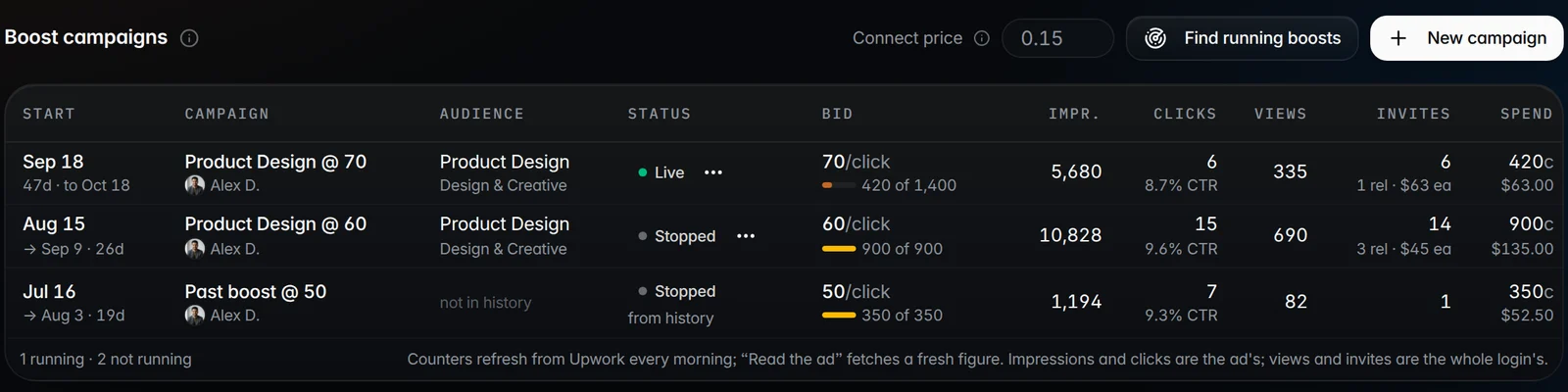
How to judge whether it pays
The test is simple: Connects spent on the ad, divided by the invitations it brought, compared with what a reply costs you through proposals. An invitation is a client who chose you first, the closest equivalent to a reply on a proposal you sent. If an invitation from the boost costs fewer Connects than a reply from bidding, the ad is the cheaper way to start a conversation.
You need a benchmark for the bidding side. Our own figures are below, from 9,788 proposals reconciled to Upwork's Connects transactions. Your agency's numbers will differ; measure your own over the same months you test the ad. The full study is in is boosting Upwork proposals worth it.
| Proposals | Sent | Viewed | Replied | Net Connects per view | Net Connects per reply |
|---|---|---|---|---|---|
| Boosted | 7,686 | 22.6% | 5.8% | 116 | 449 |
| Not boosted | 2,102 | 10.1% | 2.3% | 142 | 614 |
9,788 applications 2026-08-01 to 2026-10-19, 95.8% from Vizio AI's own sends; net of boost refunds. Not a controlled test: campaigns chose when to boost.
- 1
Record a baseline first
Two to four weeks with no boost and no badge: profile views and invitations per week from My Stats, and your Connects per reply on proposals.
- 2
Change one thing at a time
Run the boost or the badge, not both, so the invitations you count belong to one ad. My Stats flags whether the badge was on, which makes on and off weeks easy to separate.
- 3
Pick the narrowest category and specialty that fits
Relevance is half the auction. Bid where your profile already matches the searches, and check where you rank organically there first with the rank checker.
- 4
Cap spend by the day
Set a daily limit for the boost and a weekly maximum for the badge that you would accept losing in full, and keep a Connects buffer so neither is disabled mid-test.
- 5
Divide, then decide
Connects spent ÷ extra invitations over baseline. If that beats your Connects per reply on proposals, keep it; if not, pause the boost (settings kept) or turn the badge off.
Questions
How much does it cost to boost your profile on Upwork?
You choose it. A profile boost is pay-per-click: you set the Connects per click, a daily or total limit and an optional end date, and pay only when a client clicks, saves, invites, hires or views your video. Upwork publishes no minimum bid. Connects cost $0.15 each.
How much is the Upwork Availability badge per week?
It floats with the market and changes at most once a week, up to a weekly maximum you set. Upwork's examples are 14 Connects a week, deducted twice a day, and 21, one every eight hours: $2.10 and $3.15 a week at $0.15 per Connect.
How do I turn off the Availability badge on Upwork?
Go to Find work, select the pencil icon next to the Availability badge in your profile banner, and select Turn off. It works whether the badge is active or paused. The badge also pauses on its own when the price exceeds your weekly maximum or you run out of Connects.
What is the difference between pausing and turning off a profile boost?
Pausing puts the boost on hold and keeps your bid, limits and end date. Turning it off stops it and resets the settings. Both are under Find work, Boost your profile. A boost also turns itself off at its total limit, or for the rest of the day at a daily limit.
Does Upwork show if a profile boost worked?
Partly. My Stats shows impressions and clicks while the boost runs, plus profile views and invitations. It does not report cost per invitation or which hires came from the ad, so compare Connects spent per invitation with your Connects per reply on proposals.
Orhan G. Yalçın
Founder of Upsight and of Vizio AI, an Upwork agency that bids with Upsight every day. Every number on this blog comes with its sample, window and method. More about how we measure.
Terms in this post: Profile boost · Availability badge · Connects · My Stats · Talent search
Read next
Data studies
Is boosting an Upwork proposal worth it? What 9,788 proposals show
Boosted proposals were viewed twice as often and answered 2.5 times as often. They cost more Connects each, and fewer per reply once refunds are counted.
Guides
Upwork Connects in 2026: what they cost, when they come back, and how an agency should budget
A Connect costs $0.15. Our median proposal asked for 15 of them. Here is every rule an agency needs: plans, the 400 rollover cap, what costs Connects and the short list of refunds.
Guides
Why your Upwork profile is not showing in search, and how to check
Upwork hides private, inactive and incomplete profiles, and ranks the rest by a formula it does not publish. Here is what it does say, and how to find your real position.